I recently broke an entire PowerPoint deck with one word.
I asked my AI assistant to audit the deck and fix any issues it saw. Sounded reasonable enough. The deck had text boxes running off the slides, wildly inconsistent slide sizes, and the last five slides were text-only walls with no design. I wanted something cleaner and more consistent.
Instead, the AI got stuck in what felt like an infinite loop. It kept "reviewing" the deck, then restating what it would review, then explaining how it would review it, then promising to improve it. It never actually fixed a single slide the way a real designer would.
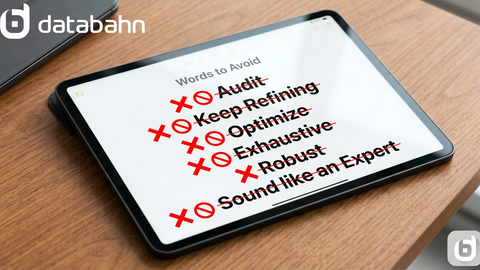
That's when it hit me: the problem wasn't the AI. It was one word. "Audit" told the model to hunt for every possible flaw, narrate the process, and stay in analysis mode instead of execution mode. Sales and marketing people do this constantly with prompts. The verbs sound smart, but they quietly push AI into the wrong gear. Here are a few of the worst offenders, and what to use instead.
"Audit"
"Audit this deck/email/sequence and fix any issues" sounds thorough and professional on paper. In practice it tells the model to hunt for every possible issue, narrate the process, and keep reviewing instead of shipping. That's exactly why "audit this deck" got me a lot of talk about layout and readability and almost no actual redesign. For sales and marketing work, "audit" usually means "I'm not sure what's wrong, please just make this better," and AI doesn't handle that kind of ambiguity gracefully.
Name the two or three things you actually want fixed instead. "Standardize all slides to the same size and layout, then rewrite any overflowing text so it fits cleanly." "Turn slides 12 through 16 into designed slides: clear headings, bullets instead of paragraphs, nothing running off the edge." "Identify the top 3 layout problems in this deck and show me before and after examples of the fix." Standardize, rewrite, turn into, identify, fix, these verbs pull AI into doing the work instead of auditing its own thoughts.
"Continuously" / "keep refining"
"Continuously improve this sequence." "Keep refining until it's perfect." "Never stop iterating." These are an open invitation to a loop, you're telling the model not to finish, just to keep going. Outbound sequences, decks, and campaign copy don't need infinite iteration. They need a small number of strong options to choose from.
Set a limit instead. "Give me 2 versions, then pick the stronger one and explain in 3 bullets why." "Do 3 passes: first draft, improved draft, final draft. Stop after the final." "Propose 3 subject lines, then pick one and write the matching body." Give it a finish line. "Continuously" isn't your friend.
"Optimize" / "improve" with no target
"Optimize this email." "Improve this deck." "Make this better." These sound like direction but carry none. The model has no idea whether you want it shorter, more specific, more emotional, more skimmable on mobile, or tailored differently for a VP of Sales versus a Director of IT, so it guesses. That's how you end up with a longer email when you wanted shorter, a fluffier deck when you wanted sharper.
Tell it what to optimize for. "Shorten this email to under 120 words and make the call to action stand out in one sentence." "Rewrite this slide to a 1-line headline, max 5 bullets, 8 words per bullet." "Make this outbound message more specific to a Fortune 1000 supply chain leader, reference their likely challenges with X and Y." If you can't finish the sentence "optimize for...", don't use the word.
"Comprehensive" / "exhaustive" / "in-depth"
"Give me a comprehensive overview." "Make this exhaustive." "I want an in-depth explanation." For most sales and marketing uses, "comprehensive" is code for "I don't know what I need yet, so please drown me in information," and AI is happy to oblige: long documents, dense paragraphs, broad coverage, and no clear sense of what actually matters for the next call or deck.
Force prioritization instead. "Give me the top 5 points a CTO would care about from this 20-page report." "Summarize this white paper into 3 slides: problem, impact, opportunity for us." "Give me a 1-page brief for a discovery call with a VP of Software Engineering." "Comprehensive" invites overwhelm. "Top 5 in one page" invites focus.
AI-sounding words in content prompts
Some words don't confuse the model, they just quietly tell your reader that a generic AI template wrote this: leverage, utilize, robust, cutting-edge, seamless, myriad, "in today's rapidly evolving landscape," "plays a crucial role," furthermore, moreover. Leave them unchallenged and they'll show up in your decks, emails, and LinkedIn posts on their own.
Ban them up front. Add a line like "use plain language, avoid words like leverage, utilize, robust, cutting-edge, seamless, furthermore, moreover, and the phrase 'in today's landscape.'" Then tell it what you do want: "sound like a clear, no-nonsense sales leader talking to their team," "write in short sentences with concrete words." This one tweak changes more of your output than you'd expect.
"Thought leadership" / "sound like an expert"
"Write a thought-leadership piece about..." "Make this sound like an expert point of view." These prompts almost guarantee fluffy, high-level content with abstract claims and zero real stories, because thought leadership isn't a style, it's depth earned through a specific experience.
Anchor it to one story and one lesson instead. "Write this as a first-person story about a failed outreach to a Fortune 500 account and what we changed next time." "Give me one concrete example from an enterprise deal and the one lesson an AE should take from it." Ask for a story and a takeaway, not a genre.
"Formal" / "professional" with no tone guidance
"Make this more formal." "Write a professional email." This is how you end up with stiff corporate-speak, unnecessary transitions like furthermore and moreover and in conclusion, and copy that reads like an insurance policy instead of a person.
Define the audience and the vibe instead. "Write this for a VP of Sales: direct, respectful, short sentences, no filler like 'in conclusion' or 'moreover.'" "Sound like a senior AE who knows their stuff, not a press release." "Professional" is too vague. "VP of Sales, direct and practical" is something AI can actually hit.
A quick way to debug your own prompts
When AI hands you something bloated, fluffy, or stuck in review mode, look back at the verb you used. Did you tell it to audit, optimize, comprehensively cover, continuously refine, or sound like thought leadership? Or did you tell it to shorten, rewrite, standardize, design, prioritize, limit, tailor to a specific persona? One word is often the difference between AI dragging you into a loop of generic, smart-sounding content and AI pulling you toward something specific and shippable.
Next time you're about to type "audit this and optimize it into a comprehensive, professional, thought-leadership piece," stop. Try something like: "Turn this messy deck into 10 clean, consistent slides for a VP of Sales. Fix overflowing text, standardize layouts, rewrite any AI-sounding phrases into plain English. One pass, then show me the final version." That's the actual difference between AI that annoys you and AI that helps you win.
Connect with me on LinkedIn if you found this useful.
Sources: