

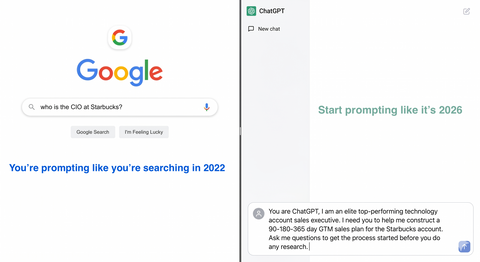
How Elite Top-Performing Enterprise AEs Are Really Using AI to Crack Greenfield Fortune 1000s
If you’re an enterprise AE carrying a seven‑figure number into greenfield or whitespace Fortune 1000 accounts, you don’t have time for AI “parlor tricks.”
You need AI to do three things, fast:
- Help you build a real account plan
- Sharpen your sales strategy
- Turn that strategy into concrete, tactical plays
Over the last 25 years, I’ve lived in the world of sales intelligence and strategic account research. Today, I use AI every day as a force multiplier for that work. Not by typing “write an email” and hoping for the best, but by using specific prompting styles that drive better thinking and better actions.
In this article, I’ll walk you through the core prompt types I rely on:
- Zero‑Shot
- Few‑Shot
- Chain‑of‑Thought
- ReAct
A few supporting styles you’ll use all the time
And a bonus: Pull Prompting, which is how you turn AI into a real thinking partner
All examples are written for you: a senior enterprise AE targeting a greenfield Fortune 1000 account.
1. Zero‑Shot: Point AI at the Problem
Zero‑Shot prompting is the simplest style: you describe the task in plain language and let the model figure out how to respond. No examples, no elaborate setup.
For complex selling, Zero‑Shot is your fastest way to explore an account, a theme, or an idea before you go deeper.
What it is:
Give AI a clear instruction and desired output, without examples.
How it helps a greenfield AE:
Use Zero‑Shot to get oriented quickly on a new account, especially when you’re still at “blank page” stage.
Example prompt (account overview):
“You are a strategic sales analyst supporting an enterprise AE. Give me a concise 10‑bullet overview of [Company]: business model, key segments, main products, go‑to‑market motion, and any major strategic initiatives mentioned in recent earnings calls or press releases.”
Example prompt (problem space):
“From a senior enterprise AE’s perspective, list 7 plausible business problems [Company] is likely trying to solve in the area of [your solution category]. For each problem, include: why it matters, who is likely accountable (title‑level only), and how success would be measured.”
Zero‑Shot won’t give you a finished account plan, but it will rip you out of “stare at the logo and hope inspiration hits” mode in minutes.
2. Few‑Shot: Teach AI Your Best Moves
Few‑Shot prompting is where AI starts to feel like a teammate.
Instead of just describing the task, you show AI a few examples of what good looks like—your best emails, your best call plans, your best executive summaries—and then ask it to produce more outputs in that same style.
What it is:
You give 2–10 input→output examples, then ask for a similar output on a new input.
How it helps a greenfield AE:
Few‑Shot is perfect for scaling your own best work across new logos:
- Cold emails that consistently convert
- Executive summaries that land with VPs and C‑suite
- Talk tracks for first meetings in a new vertical
Example prompt (outbound email, greenfield CIO):
“Here are 3 cold emails I’ve sent to CIOs at large enterprises that led to meetings.
- Email 1: [paste your email]
- Email 2: [paste]
- Email 3: [paste]
"Analyze the structure, tone, and value proposition. Now write 2 new first‑touch emails to the CIO at [Target Fortune 1000 Company], using the same style and structure, and tying the message to their likely priorities based on their latest 10‑K and earnings call.”
Example prompt (first‑meeting agenda):
“Here are 2 examples of first‑meeting agendas I’ve used with VPs of Operations at Fortune 1000 accounts where deals progressed to late stages.
– Agenda A: [paste]
– Agenda B: [paste]
Extract the common patterns. Then design a 45‑minute discovery agenda for a first meeting with the VP of Operations at [Target Company], including suggested time boxes and 6–8 questions that will uncover both strategic initiatives and immediate pains.”
With Few‑Shot, you’re not asking AI to be creative. You’re asking it to clone your best patterns and adapt them to a new greenfield logo.
3. Chain‑of‑Thought: Make the Model Think Like a Strategist
If Few‑Shot is about style, Chain‑of‑Thought (CoT) is about thinking.
With CoT, you explicitly instruct the model to reason step by step before giving an answer. That’s exactly what you want when you’re building a greenfield account plan where there is no existing deal context, no active opportunity, and no internal history.
What it is:
Tell the model: “Think this through step by step,” and structure your prompt so it has to show its reasoning path, not just the answer.
How it helps an AE in a greenfield account:
CoT is ideal for:
- Parsing strategy documents and 10‑Ks
- Turning company strategy into concrete sales opportunities
- Designing multi‑threading plans and land‑and‑expand plays
Example prompt (turn 10‑K into sales plays):
“You are a strategic account planner with 25+ years of Fortune 1000 experience. Think step by step.
Read this excerpt from [Company]’s latest 10‑K and earnings call: [paste text].
First, list their top 5 strategic priorities in your own words.
For each priority, infer 1–2 operational challenges or execution risks.
Then, map each challenge to a specific sales ‘play’ we could run with our [solution category].
Show your reasoning for each step before giving the final list of plays.”
Example prompt (multi‑threading strategy):
“Think step by step about how [Company] would evaluate and deploy a solution like ours.
- First, list the major phases of a typical enterprise buying process for this type of solution.
- Second, for each phase, identify the 3–5 most likely stakeholders involved and what they care about.
-
Third, propose a multi‑threading strategy: which titles we should engage, in what order, with what message, and at what stage.
Show your reasoning at each stage before giving the final plan.”
The power of CoT is not just the answer—it’s that you can inspect the reasoning and decide where to push back, refine, or double‑click.
4. ReAct: Reason + Act in a Loop
ReAct (short for “Reason + Act”) is how you get AI to behave more like a research assistant jumping between tools than a static text generator.
In ReAct‑style prompts, you tell the model to alternate between:
- Thinking (“Thought”)
- Taking an action (searching the web, hitting a knowledge base, querying a CRM)
- Observing the result
- Thinking again based on that observation
For you as a senior AE, that’s exactly what you do when you open a new logo: you bounce between LinkedIn, earnings calls, press releases, org charts, and internal notes, updating your mental model with each click.
What it is:
A structured loop: Thought → Action → Observation → Thought… until you reach a goal.
How it helps a greenfield AE:
Use ReAct when you want AI to:
- Drive its own research sequence
- Decide what to look up next
- Stop when it has enough to propose plays, emails, or plans
Even if you don’t have formal “tools” wired up, you can mimic the pattern with instructions like “search for X, summarize, then decide what to search next.”
Example prompt (guided account research):
“You are my AI research analyst. Follow this loop:
- Thought: Based on what we know so far, what’s the most important next question to answer about [Target Company] for a greenfield sales motion
- Action: Search the public web for information that answers that question.
-
Observation: Summarize briefly what you found.
Repeat this Thought → Action → Observation loop 3–4 times until you can confidently propose:
Three strategic initiatives we should align to
Five likely executive stakeholders (titles only)
Three specific beachhead opportunities we could lead with.
At the end, present your final recommendations in a structured brief.”
You’re basically asking AI to run a mini discovery process on the open web before you ever send a single email.
5. Supporting Styles You’ll Use Constantly
Alongside Zero‑Shot, Few‑Shot, CoT, and ReAct, there are a few prompt styles that underpin almost everything I do with AEs:
a) Role / Persona prompts
Tell the model who to be.
“Act as a CFO at a Fortune 1000 manufacturing company evaluating a new [your solution] vendor. Given this email, what would you like and what would you ignore?”
“Act as a skeptical VP of Sales reviewing this account plan. What’s missing or unrealistic?”
This simple trick will dramatically improve the relevance of the feedback you get.
b) Context / Priming prompts
Front‑load who you are, what you sell, and who you target before you ask for anything.
“I’m a senior enterprise AE selling [solution] into Fortune 1000 [industry]. ACV is [X]. Sales cycle is [Y]. Our best customers buy us to solve [problems]. Based on this context, review [Target Company]’s strategy and tell me if they look like a Tier 1, 2, or 3 target and why.”
Context is everything. Give AI the same background you’d give a new SE shadowing your territory.
c) Prompt chaining (multi‑step flows)
Instead of asking for a full account plan in one go, break it into discrete prompts:
“Summarize [Company]’s strategy and key initiatives.”
“Turn that strategy summary into 10 plausible business problems we can solve.”
“Turn those problems into 5 concrete sales plays.”
“Turn those plays into a 90‑day account penetration plan.”
This mirrors the way you already think—AI just accelerates it.
6. Bonus: Pull Prompting – Turn AI into a Thinking Partner
Most AEs use what I’d call push prompting: you try to stuff every detail into one giant prompt and hope the model spits out something good.
“Pull prompting” flips that.
Instead of forcing yourself to write the perfect prompt up front, you:
- State your goal
- Let the AI pull out what it needs by asking you focused questions
- Iterate together until the output is sharp
Think of it like coaching a junior rep: they don’t need a 3‑page brief, they need a clear goal and the ability to ask smart questions.
What it is:
An interaction pattern where the model drives the clarification and scoping by asking you questions, instead of you over‑engineering the initial prompt.
How it helps a greenfield AE:
Pull prompting is fantastic when:
- You’re not sure how to ask for what you want
- You’re still thinking through the strategy yourself
- You want AI to help you structure your own thinking
Example interaction (building an account plan):
You:
“Help me build a 1‑page strategic account plan for [Target Fortune 1000 Company]. I sell [solution] into [ICP]. This is a pure greenfield logo.”
AI (if prompted correctly):
“Great. I’ll help you build a plan, but first I need a few details to make it useful.
- What’s your typical champion or buying center?
- What key outcomes do your best customers care about?
- What’s your average land deal size and time‑to‑value?”
You answer, the AI builds a first draft, then asks:
“Do you want to emphasize a land‑and‑expand motion, or a bigger initial land? Any strong competitor presence we should assume?”
By the end, you have a co‑created account plan that reflects both your expertise and the model’s research and structuring abilities.
You can even make “pull prompting” explicit in your instructions:
“You are my AI account planning partner. My goal is to build a solid greenfield account plan for [Company]. Ask me 5–10 targeted questions to understand my product, ICP, sales motion, and constraints. Then draft the account plan. If something is unclear, ask follow‑up questions before finalizing.”
That’s how you turn AI from a content vending machine into a real partner in how you think about your territory.
Bringing It All Together in Your Day‑to‑Day
Here’s how I’d weave these styles into a practical, repeatable workflow for a greenfield Fortune 1000 account:
- Zero‑Shot to get oriented
- Quick company overview, strategic themes, and plausible problem areas.
- Chain‑of‑Thought to translate strategy into plays
- Step‑by‑step reasoning from 10‑K/earnings → initiatives → risks → sales plays.
- ReAct‑style prompts to drive focused research
- Let AI decide what to look up next and when it has “enough” to recommend stakeholders and plays.
- Few‑Shot to scale your best messaging
- Use your existing winning emails, agendas, and talk tracks to generate new ones tailored to the account.
- Role + Context + Chaining to shape the plan
- Frame the model as a strategic sales analyst with your ICP and goals in mind, then chain prompts from strategy to plays to tactics.
- Pull prompting whenever you feel stuck
- Instead of wrestling with the “perfect prompt,” let the AI ask you the questions you’d ask a junior rep, and build from there.
This is how you move beyond “AI writes my email” into “AI helps me think through and operationalize a complex, seven‑figure greenfield motion.”
If This Was Helpful…
If this gave you a clearer way to think about AI prompting as a senior enterprise AE—especially in greenfield or whitespace Fortune 1000 accounts—I’d love to stay connected.
Like this article so more AEs see it in their feed
Connect with me here on LinkedIn if you want more concrete prompt templates for account planning, executive research, and multi‑threading strategies
AI won’t replace top‑performing enterprise reps.
But the reps who learn to drive AI with the right prompts will absolutely outpace the ones who don’t.